


Skip to content
AddwiseInstall now

Where is your store?

Addwise runs on Wix and on Shopify. Choose your platform to start the install there.

Wix

Add Addwise to your Wix site

Opens Wix’s app installer. Sign in to Wix, pick the site, and review the permissions before anything is added.

Continue to Wix

Needs a Wix site with Wix Stores.

Shopify

Add Addwise to your Shopify store

Shopify asks you to log in and approve the install. Already in your Shopify admin? Pick the store there.

Addwise logo

Upsell app for Wix and Shopify

The upsell app that proves it pays for itself.

Addwise puts one add-on offer in your cart, applies the discount at checkout, and shows you what the offer earned next to what the app costs.

Install now

Where is your store?

Addwise runs on Wix and on Shopify. Choose your platform to start the install there.

Wix

Add Addwise to your Wix site

Opens Wix’s app installer. Sign in to Wix, pick the site, and review the permissions before anything is added.

Continue to Wix

Needs a Wix site with Wix Stores.

Shopify

Add Addwise to your Shopify store

Shopify asks you to log in and approve the install. Already in your Shopify admin? Pick the store there.

See how it works
  • 14-day free trial
  • $9 or $19 a month, flat
  • No revenue share
In the cart
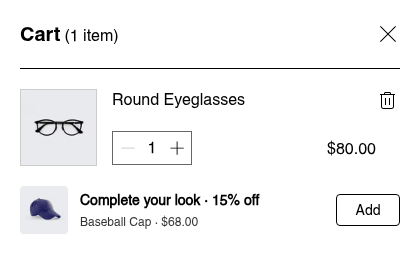
A Wix side cart with Round Eyeglasses at $80.00. Below it, the Addwise offer: Complete your look, 15% off, Baseball Cap, $68.00, with an Add button.
At checkout
The Baseball Cap line in the checkout order summary: $68.00 crossed out, $57.80.

See it in action

How it works

Three steps, and you can check every one.

The screenshots follow one order through a Wix store: the offer in the side cart, the discount at checkout, and the result in the dashboard.

  1. The offer appears in the cart

    You choose one product and a discount. When a shopper opens the cart, they see it as a single card with an Add button. One click puts it in the cart.

    The card shows the product’s regular price, $68.00 here, and says how much comes off. The discounted price itself is shown at checkout.

    Side cart: Round Eyeglasses, $80.00, and the offer card Complete your look, 15% off, Baseball Cap, $68.00, Add.
    The offer card in a Wix side cart.
  2. The discount is applied at checkout

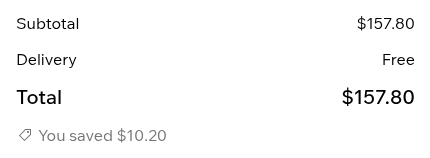
    The shopper does not type a code. At checkout the offered product is repriced, and the order total shows what they saved, so they can see exactly what the offer gave them.

    • $68.00 → $57.80
    • −$10.20 (15% off)
    Checkout order summary, Baseball Cap line: $68.00 crossed out, $57.80.
    Checkout order summary totals: Subtotal $157.80. Delivery free. Total $157.80. You saved $10.20.
    Two parts of one checkout order summary: the offered product’s line and the totals. Only the offered product is discounted.
  3. Results show whether it paid for itself

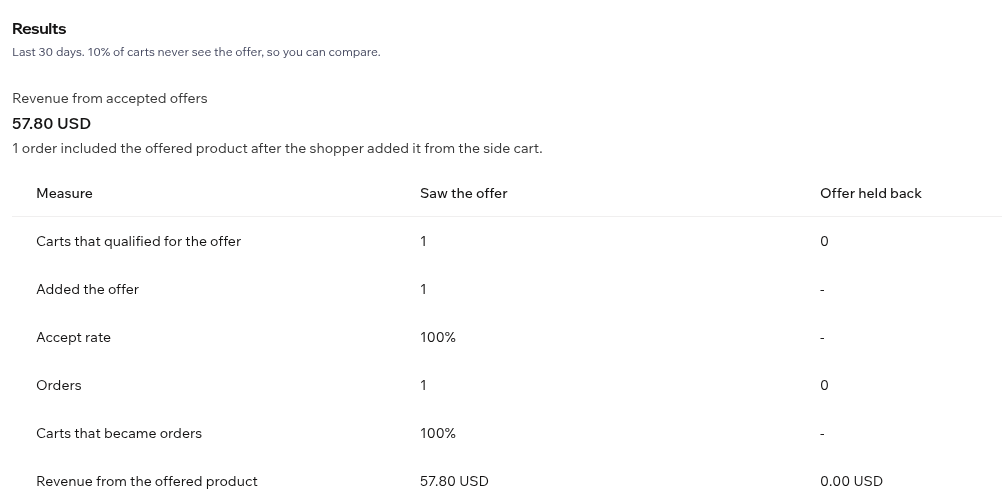
    Addwise counts the carts that saw the offer, the shoppers who added it, and the orders that included it, and reports the revenue from the offered product.

    On Wix, 10% of carts are held back and never see the offer, so you compare against shoppers who were not offered anything. You can switch the holdout off.

    Results, last 30 days. Revenue from accepted offers: 57.80 USD. A table compares carts that saw the offer with carts where the offer was held back: carts that qualified, added the offer, accept rate, orders, carts that became orders, and revenue from the offered product.
    The Results card in the Wix dashboard, after one order.

Wix & Shopify

Built for each platform, not ported.

Addwise is a Wix upsell app and a Shopify cart upsell. Both versions use only the extension points the platform provides. Nothing is scripted into your checkout.

Wix

A one-click offer in the Wix side cart

A Wix cart upsell for sites that sell with Wix Stores.

  • One offer card in the side cart: your product, your headline, and a discount from 0 to 50%.
  • The discount is a native Wix discount rule. It applies only to shoppers who accepted the offer in the cart; the same product bought from its product page stays at full price.
  • A 10% holdout group, on by default, and a Results card that compares carts that saw the offer with carts that did not.
  • Visits you make from the Wix editor and preview are kept out of Results.
Shopify

A cart offer through a theme app extension

For Shopify stores on any plan. Shopify Plus is not needed.

  • One offer on the cart page or in the theme’s cart drawer, added from the theme editor as an app block or app embed.
  • Show it for any cart, or only when the cart contains products or collections you pick.
  • A percentage off is a real Shopify discount limited to the offered product, applied when the shopper adds it.
  • The dashboard shows offer views, accepts, and attributed revenue next to your current plan fee.

Pricing

Two flat prices. No free plan, no revenue share.

Both plans start with a 14-day free trial and are billed only after it ends. The price does not move with your sales.

Starter

Stores with up to 500 orders a month

$9 per month (every 30 days)

14-day free trial

  • One cart offer
  • Up to 500 orders a month. Going over does not add a charge in the middle of a billing period.
  • Results and attributed revenue
Start free trial

Where is your store?

Addwise runs on Wix and on Shopify. Choose your platform to start the install there.

Wix

Add Addwise to your Wix site

Opens Wix’s app installer. Sign in to Wix, pick the site, and review the permissions before anything is added.

Continue to Wix

Needs a Wix site with Wix Stores.

Shopify

Add Addwise to your Shopify store

Shopify asks you to log in and approve the install. Already in your Shopify admin? Pick the store there.

Growth

Stores above 500 orders a month

$19 per month (every 30 days)

14-day free trial

  • Everything in Starter
  • Unlimited orders
Start free trial

Where is your store?

Addwise runs on Wix and on Shopify. Choose your platform to start the install there.

Wix

Add Addwise to your Wix site

Opens Wix’s app installer. Sign in to Wix, pick the site, and review the permissions before anything is added.

Continue to Wix

Needs a Wix site with Wix Stores.

Shopify

Add Addwise to your Shopify store

Shopify asks you to log in and approve the install. Already in your Shopify admin? Pick the store there.

On ShopifyYou approve the plan in your Shopify admin. After the 14-day free trial it is billed through your Shopify account. You can cancel anytime. Plan changes apply from the next billing period, never mid-period.

On WixAfter the 14-day free trial, Starter ($9 a month) and Growth ($19 a month) are billed through your Wix account. You can cancel anytime.

FAQ

Questions merchants ask first.

Something else? Write to partnerships@busymonkeysstudios.com.

How does the 14-day free trial work?

You pick Starter or Growth, and the first 14 days are free. If you cancel or uninstall before the trial ends, you are not charged. After the trial the plan is billed through your Wix or Shopify account, and you can cancel anytime.

What if Addwise doesn’t pay for itself?

If Addwise doesn’t make you more than it costs, that month is free. Starter’s $9 and Growth’s $19 are the most you pay for a month (every 30 days). Any month where Addwise-attributed sales are below your plan price is free. In any other month you pay the plan price, never more.

Addwise-attributed sales are the revenue from the offers shoppers accepted, the figure your results show.

Is there a free plan?

No. After the trial your store needs Starter or Growth. Without an active plan or trial, the Shopify admin shows only the plan page and offers are hidden from your storefront; your saved offer is kept.

What is different between Wix and Shopify?

On Wix the offer appears in the Wix Stores side cart, the discount is a native Wix discount rule, and Results include a holdout group for comparison.

On Shopify the offer appears on the cart page or in the cart drawer through a theme app extension, the discount is a Shopify discount on the offered product, and the dashboard shows attributed revenue next to your plan fee.

The two versions are separate installs. A plan on one does not cover the other.

How am I billed?

Shopify: through Shopify’s own app billing, on your Shopify invoice, at most $9 or $19 every 30 days in USD. There is no usage fee and no revenue share, and Addwise never moves you to a higher plan by itself.

Wix: billed through your Wix account, at most $9 or $19 a month after a 14-day free trial. You can cancel anytime. There is no usage fee and no revenue share, and Addwise never moves you to a higher plan by itself.

How do I cancel?

Shopify: cancel on the plan page inside the app, or uninstall the app, which makes Shopify cancel the subscription. Cancelling stops all future charges. A period that has already been billed is not refunded in part.

Wix: remove the app under Manage Apps in your site dashboard. The discount rule the app created is removed with it.

Why does the cart show the full price?

In the Wix side cart the offer card shows the product’s regular price and the percentage off. The reduced price appears at checkout, next to the crossed-out regular price. In the screenshots above that is $68.00 in the cart and $57.80 at checkout.

Will this change my checkout?

No. Addwise does not inject scripts into checkout and does not replace your cart. The only thing shoppers see at checkout is the discount line for the product they accepted.

Install now

Where is your store?

Choose your platform. The install happens on Wix or Shopify, where you can review the permissions before you accept.

Wix

Add Addwise to your Wix site

Opens Wix’s app installer. Sign in to Wix, pick the site, and review the permissions before anything is added.

Continue to Wix

Needs a Wix site with Wix Stores.

Shopify

Add Addwise to your Shopify store

Shopify asks you to log in and approve the install. Already in your Shopify admin? Pick the store there.